How to turn other people's LinkedIn activity into warm leads
First the method in plain English. Then how to automate it with Vaam so it runs itself.
I get asked this every week: how do you book so many meetings off LinkedIn without spamming people? Here's how we do it.
First I'll show you the method in plain English, so you can run it by hand. Then I'll show you how we automate it with Vaam.
The idea, short version
LinkedIn is full of buying signals. Every time someone comments or reacts to a post in your space, they're basically putting their hand up. The topic is top of mind for them right now.
Most sellers ignore that signal and fire cold pitches at strangers. The playbook does the opposite: let other people's content do the prospecting for you, then reach out with context.
There are two ways to run the playbook: manually on LinkedIn, or automated with Vaam. We'll walk through both.
How to run the playbook manually
All you need is your LinkedIn account and a bit of discipline. Here's the flow.
1. Pick your sources
Start by listing 3 LinkedIn profiles or company pages your ideal customer engages with. Over time, you'll scale up to dozens. Competitors, complementary vendors, industry voices, trade media, and your own leadership and thought leaders. Sources are the engine of the playbook. Better sources, warmer leads.
2. Watch the posts
Go through your sources' posts daily or a few times a week. For every post that touches on your problem space, note who's commenting and reacting.
3. Filter the signal
Not every bit of engagement is a lead. Look at title, seniority, and company. Cut 1st-degree connections (usually your own network and existing customers) and focus on 2nd and 3rd. A comment is a stronger signal than a reaction. And a reaction on a post that hits your exact problem space beats a generic like.
4. Reach out at the right moment
This is where the signal pays off. You know you're reaching the right person at a better moment, while there's real engagement around your category. Don't mention the exact post they interacted with. That lands creepy from a stranger. Keep the first message short, open a conversation about the problem you solve, and let the timing do the work.
5. Follow up in a sequence
One message rarely does it. Run a simple sequence: connection request, follow-up after 3 days, value message after a week, video message after two weeks. The moment someone books, they drop out of the sequence.
The key: run it consistently
None of the steps above are magic. The people who actually book meetings off LinkedIn haven't found a trick. They just run the playbook with discipline, week after week. New sources get reviewed on Mondays, engagement gets checked daily, follow-ups go out on time. Do the same and the leads come. The only real problem is sticking with it.
Why it doesn't scale manually
This is where most people hit a wall. Watching sources, tracking engagement, filtering out the noise takes hours every week, per source. You always miss posts, especially around weekends and holidays. It gets hard to track who you've already contacted. And once you pass five or ten sources, it becomes unmanageable. The playbook works, but only if someone actually runs it every day.
How to automate the playbook with Vaam
Vaam runs the same playbook, just without you doing the work. You set it up once and let it run.
1. Create a trigger
A trigger watches a source. Pick the type based on what you want to catch:
- → Company posts: watches a company page and picks up everyone who engages
- → Profile posts: watches a single LinkedIn profile
2. Set the filter
Decide exactly which signals count:
- → Engagement type: comment, reaction, or both
- → Connection degree: 1st, 2nd, 3rd, or all
- → Decision-makers: titles you want to target (e.g. VP Sales, Head of Growth, CMO)
- → Watch window per post: 3, 7, 14, or 30 days
3. Connect a sequence
Choose which outreach flow matched prospects drop into. Typical sequence: connection request, text message, video message via Vaam, follow-up. Same logic as manual, automated.
4. Turn on the approval step (optional)
Want full control? Switch on "requires approval" and matched prospects land in a queue. You see name, title, and engagement, and approve with one click before they enter the sequence.
5. Step back. Vaam handles the rest
Once the trigger is live, Vaam works in the background:
- → Finds new posts from your sources automatically
- → Pulls out everyone who commented and reacted
- → Our AI filters down to the prospects that fit your ICP
- → Adds the right prospects to your sequence
- → Sends messages and videos at the right cadence
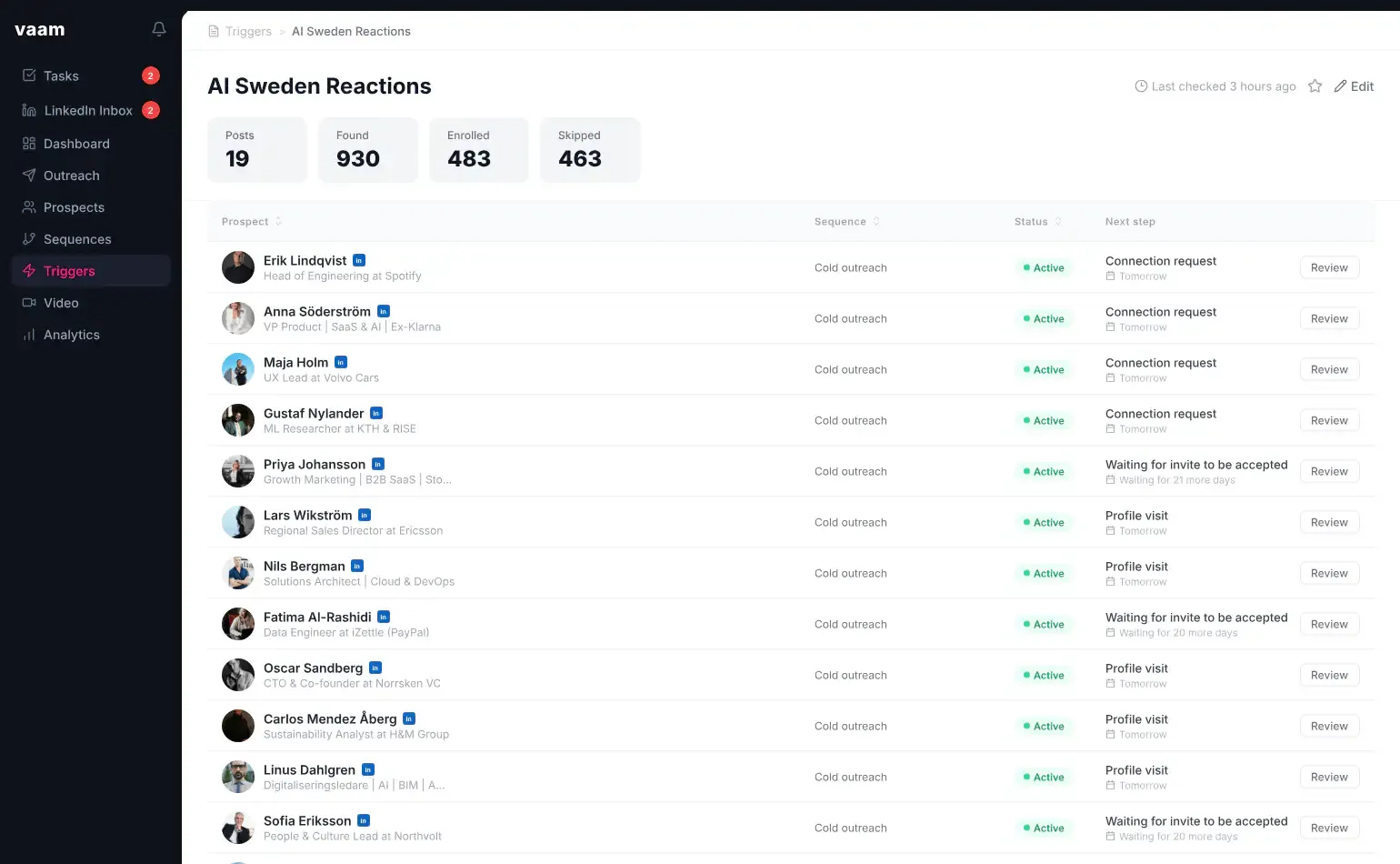
- → Logs everything in the dashboard: found, added, skipped
That's the whole playbook. No magic wand, just a simple idea run with discipline. Run it manually for a week to get the feel, and switch on Vaam when you want your time back.
– Josef
Takes about 30 sec • No sales call • Answers right away